All-day recording,
daily recap
Record your day on Apple Watch. Your iPhone transcribes it, tells speakers apart and writes an evening recap: what was decided, who promised what, what you have to do. Audio stays on your phone.
Requires iPhone (iOS 26) and Apple Watch (watchOS 26). 3-day free trial.
- Audio stays on your phone
- Transcribed on your iPhone
- No account, no tracking
- 3-day free trial
Why record all day
The most important things said in a day are gone by evening
Decisions made in meetings, promises made in hallways, commitments made on the phone are scattered across a day of conversations. Recapse records them as they happened and sorts them into three things each evening.
What was decided
Every decision carries a timestamp and opens to the original audio.
Who promised what
What you promised others and what they promised you, grouped by person and open until closed.
What you have to do
To-dos and spoken reminders, one tap into the Reminders app.
How it works
The watch records, the phone listens, the Mac is where you work
Apple Watch
Tap once, put your wrist down, done
Recording continues in the background. Every few minutes a chunk goes to your iPhone and is deleted from the watch only after the phone confirms it arrived. If a call, an alarm or another app interrupts, the watch notifies you; raise your wrist and tap once to resume. Gaps are marked on the timeline.
- Press “Mark”, say what to remember, and it goes straight into the day’s recap
- A watch face complication shows the recording time, so you always know it is running
- The system microphone indicator stays on while recording. Nothing is hidden
iPhone
Transcription and speaker separation happen on this phone
When chunks arrive, the iPhone transcribes them on device (standard or high-accuracy, Chinese and English mixed), labels who said each line and splits the day into scenes by time and people. The heavy work runs while charging at night, not while you use the phone.
- Every line carries its speaker. Fix mistakes line by line, undo bulk assignments
- Name a voice once and its past and future speech go to that person. Voiceprints never leave the phone
- Audio is deleted after the retention period: 7, 30, 90 days or never
Mac
See the day on a big screen, edit minutes, export
The Mac app syncs text and audio from your iPhone over the local network, with no server in between. A day’s scenes, decisions and to-dos sit on one canvas. Minutes can be edited and exported as PDF or Markdown.
- Sync runs only on the same Wi-Fi, after pairing is confirmed
- The Mac keeps its own copy of the audio, with its own retention period
- One purchase covers iPhone and Mac
Privacy
Audio never leaves your phone. The AI only ever sees text
Audio goes from the watch to the iPhone, is transcribed and separated by speaker there, and is never uploaded to any server. Only transcript text is sent to an AI model, and only to write the recap.
Started in the foreground, continued in the background. Records only, processes nothing.
All on device. Audio is deleted after the retention period.
- Voiceprints
- People’s names
- Vocabulary
- Local database
Your own API key, or Recapse’s cloud relay, which discards the text once processed.
Two ways to run the AI, your choice
With your own API key, text goes straight from the phone to the provider you pick (DeepSeek, Qwen, Moonshot, OpenAI, Claude). With Cloud AI, it passes through Recapse’s service and is discarded once processed. Nothing is stored.
Speakers are only numbers in the cloud
In the text sent to the AI, people appear as “me”, “speaker one”, “speaker two”. The names you give them are swapped back on the phone.
No account
No sign-up, no sign-in, no advertising, no tracking. Purchases are handled by Apple; we never see payment details.
Tell people before you record
And follow the law where you are.
Speakers and the recap
From a day of audio to a recap you can act on
The first five steps run on the iPhone. Only the last one uses an AI model, and it is sent text only.
- Chunks arriveEvery few minutes
- Silence removedNothing blank is transcribed
- On-device transcriptionStandard · high accuracy
- Speaker separationMe · speaker one, two, three
- Split into scenesBy time and people
- AI write-upText only
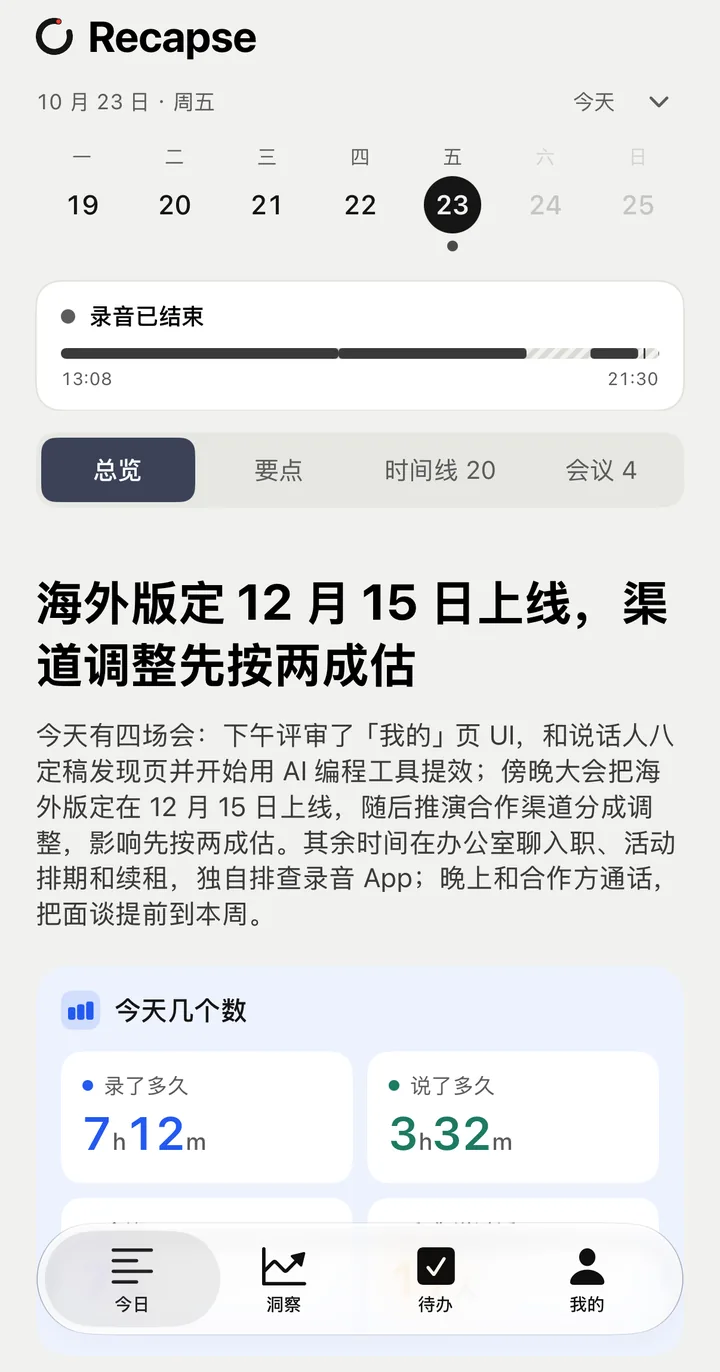
One recap every evening
Grouped into work and life: what was decided, what you promised, what others promised you, what still needs confirming. Every item opens to the original audio.
Minutes for every meeting
Parts recognised as meetings get their own minutes: topics, decisions, to-dos. Small talk afterwards is kept at the end, apart from the conclusions.
Say “remind me”
Say
remind me to measure the new flat tomorrow at ten
while recording. Recapse extracts the task, time and place and notifies you on time. Trigger phrases are editable.People, promises and a weekly review
Promises are grouped by person and stay open until closed. Each week brings a review: themes, decisions, what is still unresolved.
Pricing
Buy once or subscribe. Try it for three days first
The 3-day free trial starts on the first day with recordings and includes everything, Cloud AI too.
Lifetime
Every on-device feature, no time limit.
- AI with your own API key (DeepSeek, Qwen, Moonshot, OpenAI or Claude)
- Mac app for viewing and export
- Cloud AI can be added month by month
Cloud AI
Everything in Lifetime, no key needed. AI provided by Recapse.
- 8 hours of recordings a day, 30 meetings a month on the deep model
- Beyond that, the standard model, without interruption
- Edits made on the Mac sync back to the phone
Prices are set in the App Store and vary by region. Cloud AI is not available in mainland China at the moment. When the trial ends without a purchase, new recordings are no longer processed; existing recordings, transcripts and recaps stay viewable and exportable. Subscriptions can be cancelled any time in your App Store account settings.
Download
Coming to the App Store
Recapse is distributed through the App Store. One purchase covers iPhone and Mac; the Apple Watch app installs with the iPhone app.
Coming soonApp StoreQuestions: support@recapse.com
- iPhoneiOS 26 or later
- Apple WatchwatchOS 26 or later, used for recording
- MacmacOS 26 or later, optional
- First launchDownloads transcription and speaker models (a few hundred MB; Wi-Fi recommended)
- TranscriptionChinese and English, including mixed speech. Japanese comes in a later version
- InterfaceCurrently in Simplified Chinese. English and Japanese interfaces are planned